If you have a Java-enabled browser, you can experiment by clicking and dragging the red points below.
This page contains a number of interactive geometry problems which allow you to work interactively with polygons
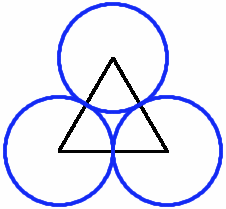
The first applet gives an example of a triangle where circles are centred at each vertex and are each tangent to the two others. Notice here that every possible triangle allows for the circles to be tangent to one another. You can check by clicking on points A, B, and C and moving them around.
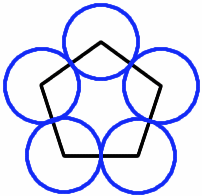
The next applet is a 5-sided polygon. Again you can check that wherever you move the points A, B, C, D, or E, the circles centred at those points will remain tangent to its two adjacant circles.
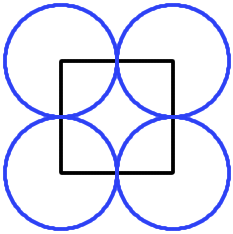
In the final applet below we have a 4-sided polygon. Here you see that there are 4-sided polygons where the 4 circles are not all tangent to one another.
In the applet below, you may click and move each of the vertices, A, B, C, and D. You may also change the radius of the circle based at A by sliding point X, and the purple circles will remain tangent to the blue circle. The red and light-blue circles centred at D are each tangent to one of the purple circles, and the challange is to move all the points so that the red and light-blue circles lie on top of one another. Then you have made all the circles tangent to their neighbours.
For the final challenge, what is the locus of the point D when it moves so that the red and light blue circles always touch their neighbours maintaining a perfect polycircle?
To experiment further with this problem, download a copy of Geometer's Sketch Pad, install it, and then open the three sketch files: